This is your last free member-only story this month.
Basic Text Summarization in Python
How to transform complex written reports into 300 word condensed summaries using text summarization

Background
Text summarization is a sub-set of text mining and natural language processing that aims to take long corpus of text and transform them into a summary that can be easily and quickly read and understood without losing the meaning of the original text.
In particular text summarisation “tokenizes” words (i.e. converts them into data) and then assesses the importance of each by looking at relative frequency and other factors. The word importance scores can then be aggregated back into values for sentences with the most important sentences bubbling up to the top of the summary.
If you would like a more in-depth exploration of the principles, this article is a great place to start — https://towardsdatascience.com/a-quick-introduction-to-text-summarization-in-machine-learning-3d27ccf18a9f
Objective
The objective of this article is to produce a basic interactive text summarization utility to demonstrate the principles and to provide a way of generating basic summaries for complex reports.
The summarization will have been successful if the summaries impart the majority of the meaning of the source report and can be read and understood in a fraction of the time.
Preparation
To start with we will need to import the libraries that will be used …
File Operations
The building blocks for our text summarization utility handle the leg-work of allowing the user to browse the local file system to select a file to summarize.
openfile() handles showing the File | Open dialog box, selecting a file, and returning the full path of the selected file.
Next getText takes the path, opens the file and reads the text contained in the file into a str. The code provided can read from .txt or .docx files.
Text Summarization
The main work is done in a single line of code by calling the gensim.summarization.summarize function. The same effect can be achieved by using the nltk natural language toolkit but it would be more involved and it would require a bit more low level work.
The summarise function provides the implementation and it follows 3 basic steps involved in text summarization -
- Pre-process and prepare the text.
- Perform the text summarization process.
- Post-process and tidy the result.
There will be many serious, industry-strength text processing engines that involve complex and comprehensive implementations of these 3 steps but this serves as a good example and it does provide summarization which can be quite useful as we will see.
Calling the Text Summarization
The last few helper functions are -
printmdwhich formats and prints text that includes markup to give us a nicely formatted heading.openLocalFileAndSummarizewhich calls the functions we have defined above to select a file and summarize the contents.on_button_clickedwhich handles the button click event to add interactivity to the Notebook and to enable several files to be selected and summarised sequentially.
Testing the Summarization
In order to test the text summarization I collected the text from two public web sites which have published freely available reports on the topics of online reporting and marketing.
The two web sites used to provide the test data are -
- https://www.sustainability-reports.com/unleashing-the-power-of-online-reporting/
- https://www.mckinsey.com/business-functions/marketing-and-sales/our-insights/were-all-marketers-now
Running the Summarization
Lastly a single line of code creates a button that can be clicked repeatedly to select a .txt or a .docx from the local disk which will then be transformed into a 300 word summary which is printed out below.

When the button is clicked a File | Open dialog box is displayed to select a file-

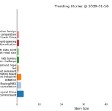
Once the file has been selected gensim.summarization.summarize does the work and the output is formatted in the cell output -
Executive Summary for Unleashing the Power of Online Reporting.txt
Unleashing the Power of Online Reporting Source: Sustainable Brands, 15 February 2018 Confronted with an ever-growing demand for transparency and materiality, companies need to find an adequate format to publish both financial and pre-financial information to their stakeholders in an effective way.In the real world, they are confronted with a multitude of information sources different in name, type and content, like Annual Report, CSR Report, Financial Statement, Sustainability Report, Annual Review, Corporate Citizenship Report, or Integrated Report.Online integrated reporting to the rescue Research from Message Group among Europe’s 800 largest companies shows that between 2015 and 2017 the number of businesses publishing financial and extra-financial information in one single integrated report increased by 34 percent, while the number of companies publishing separate sustainability and annual reports decreased by 30 percent.Unlike stand-alone annual or sustainability reports, online integrated reporting formats put an organization’s financial performance, business strategy and governance into the social, environmental and economic context within which it operates.Instead of directing readers from a webpage to separate PDF reports and resources located in different online places, Core & More provides all the relevant information on a single multi-layered website.Moreover, it is flexible enough to integrate multiple reporting frameworks, accounting standards and concepts, such as the International Financial Reporting Standard (IFRS) in combination with GRI, <IR>, the TCFD recommendations, or the SDGs.
 On top of all this flexibility, a digital reporting format is highly interactive and customizable, allowing the reader to create charts or compile selected content into personal PDF or printed reports.Turning reporting into a powerful communications tool In view of growing demand for ESG disclosure, the related surge in sustainability reporting, and a complex reporting landscape companies are challenged to find a disclosure format for both financial and extra-financial information that has a measurable value for their key stakeholders.
Conclusion
Text summarization can be a complex and involved process of pre-processing, summarization and post-processing and a real-world application that could summarize complex reports without losing the meaning of the original text would have commercial value.
However, in this article we have explored the basic concepts and quickly built a simple text summarization tool that can be used to open .txt or .docx files and then summarise the contents into 300 words based on evaluating the most popular sentences.
The test on two public reports proved that the basic text summarization process works and provided an example of what the summarization output looks like.
The full source code can be found here -
Thank you for reading!
If you enjoyed reading this article, why not check out my other articles at https://grahamharrison-86487.medium.com/?
Also, I would love to hear from you to get your thoughts on this piece, any of my other articles or anything else related to data science and data analytics.
If you would like to get in touch to discuss any of these topics please look me up on LinkedIn — https://www.linkedin.com/in/grahamharrison1 or feel free to e-mail me at GHarrison@lincolncollege.ac.uk.


.png)



.png)


.gif)